ESP
Role, heat, distance.
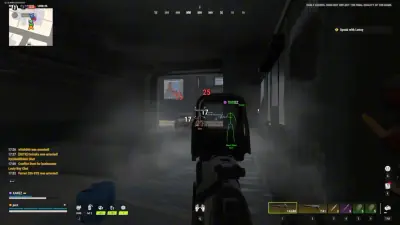
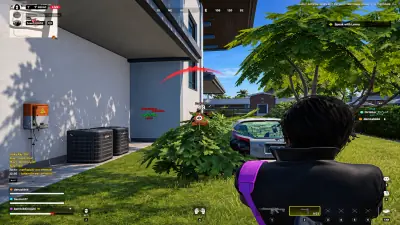
Player ESP in Rob Run tags criminal, cop, civilian and NPC, plus heat and whether someone is aiming at you.
- Role tags
- Police colour
- Wanted state
- Aiming indicator
- Separate from aim
Player ESP with role tags, a soft aimbot, and a filtered radar for Rob Run on Steam. Vehicle, loot and base markers are in the same build.

Steam
Client
Win 10/11
System
Cloud DMA
Delivery
On ESP
Roles
Features
Rob Run cheats here are a city read: role-tagged ESP, a soft aimbot, radar, vehicles, loot and bases. Aim settings stay on their own tab.
Role, heat, distance.
Player ESP in Rob Run tags criminal, cop, civilian and NPC, plus heat and whether someone is aiming at you.
Glow through cover.
Glow and chams draw a player through a wall, with a separate police colour. Outline is the better read on an open street.
Short city fights.
The soft aimbot uses a small FOV, smoothing, humanization, bone choice and a distance cap for fights that start on the pavement.
Weapon handling.
No recoil and soft no spread are weapon switches, separate from the aimbot tab. Recoil in Rob Run is short-range, and flat is the point of the switch.
Escape and value.
Vehicle ESP shows owner, lock, fuel and health. Loot and stash markers can hide items under a minimum value.
Map, not the world.
The 2D radar filters players, vehicles, loot, cameras, hideouts, objectives and banks, with range, zoom and an FOV cone.
Separate from aim.
Triggerbot has its own hold or toggle, hitboxes, a reaction delay and a visible-only check. It does not share the aimbot sliders.
On the aim tab.
Silent aim and memory aim sit on the aimbot tab with smoothing, bone priority and a maximum distance.
Fight filter.
Battle mode hides world labels in a fight and keeps enemies. A Rob Run hotfix can change which switches still draw.
Store
Compare the cheat menu and the utilities on this grid. Open a product page for the feature list and checkout.
Role-tagged ESP, a soft aimbot, radar, and the city layers listed on the product page.
Soft aimbot, role-tagged ESP, radar, vehicle and loot markers, no recoil and a triggerbot.
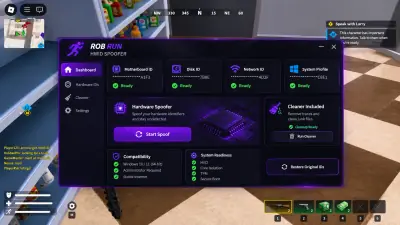
Disk serials, MAC addresses, and GPU IDs get a new pass. The cleaner in the license runs before the next sign-in.
After a hardware flag, this license rewrites disk serials. It also rewrites MAC addresses, GPU IDs, and related fingerprints. Trace cleanup is in the same license.
A Hyper-V environment for one Windows PC with guided installation and encrypted activation.
Cloud DMA may require GREENWARD, Static Server and AWS as separate purchases. Check the full requirements and current price at checkout.
Weapon skins and outfits, drawn on this PC, without a separate purchase for each cosmetic.
A small client paints premium weapon skins on your screen. Outfits and knife variants are included, across the major titles it lists.
Why us
Role-tagged ESP, a soft aimbot and a radar you can filter.
Hotfixes
Early Access hotfixes can break a build.
Aim settings
FOV, smoothing, humanization, bone and max distance sit on the aimbot tab. ESP keeps role tags and heat.
Support tickets
Order and loader questions go through the Support page, with the order email and Windows version in the ticket.
Menu options
Each listed layer has its own switch, including battle mode. After a hotfix, open the menu and see what still draws.
Compatibility
Steam on Windows 10 or 11. An Easy Anti-Cheat update can change what still runs.
HWID help
The HWID Spoofer page covers a hardware flag. An account ban stays on the account. Ask support before you assume which one you have.
Steam
PC client
Rob Run on Steam. The build is listed for that client, not for consoles.
EAC
Anti-cheat
The Steam page lists kernel-level Easy Anti-Cheat. A hotfix can move what the loader reads.
DMA
Cloud delivery
Cloud DMA provisions Hyper-V on this PC. It is a separate purchase from the cheat.
Setup guide
Cloud DMA provisions first. Then Rob Run from Steam, then the loader, once you are in the city.
Confirm Windows, then Cloud DMA
Launch Rob Run from Steam
Open the menu and save a config
How it works
Three steps to a portal profile you can load next time.
3 easy steps
Choose your product
Pick the cheat suite, or a utility when the issue is this PC or an account limit.
Launch & configure
Start the loader only after Rob Run is open, then set role tags, aim and the radar before you leave cover.
Save your profile
Save the menu profile in the portal so the next session starts from those settings.
Blog
ESP, aim settings, base reads, setup order and what to check after a hotfix.
A banned account is cheap in a free game. A banned machine is not. Run the test, then follow the clean, spoof and reboot sequence.
In an Early Access game a hotfix is a weekly event, not an emergency. Here is the order that separates a patch problem from a machine problem.
Player bases hold the good loot and player defenses decide the cost. Base ESP reads the layout, the raid lock and the workbenches before you commit.
FAQ
Answers for this page. The FAQ page holds the rest.